

SLM-AI-8-V#
Description#
8-channel 0-10V input module.
13-bit Resolution for precision control
Designed for industrial control applications.
Configuration#
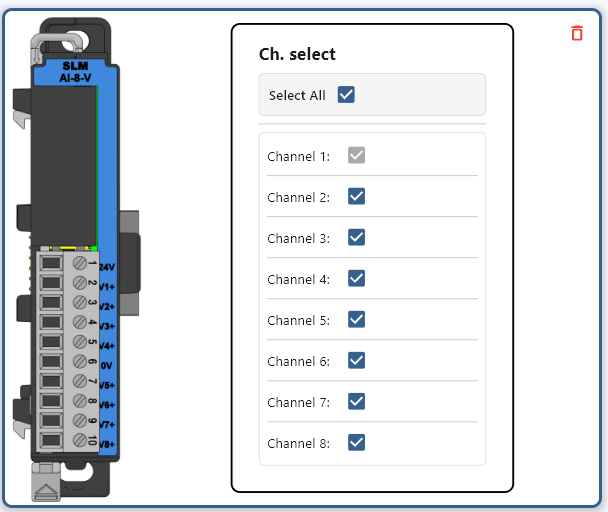
Channel Select
Enable or disable the channels to be read. The first channel cannot be disabled.
Modbus Mapping#
Note
The following register mappings assumes that it is the only module connected. Actual mapping may vary depending on the configuration of the system.
Modbus Register Mapping#
Channel |
Modbus Register |
Access |
Register Type |
Data Length |
|---|---|---|---|---|
Ch1 |
30001 |
Read-Only |
Input Register |
16-bit |
Ch2 |
30002 |
Read-Only |
Input Register |
16-bit |
Ch3 |
30003 |
Read-Only |
Input Register |
16-bit |
Ch4 |
30004 |
Read-Only |
Input Register |
16-bit |
Ch5 |
30005 |
Read-Only |
Input Register |
16-bit |
Ch6 |
30006 |
Read-Only |
Input Register |
16-bit |
Ch7 |
30007 |
Read-Only |
Input Register |
16-bit |
Ch8 |
30008 |
Read-Only |
Input Register |
16-bit |
Notes:
Each Modbus Holding Register corresponds to a single analog input channel.
0-10V inputs* are read-only and mapped to Modbus Input Registers (30001 - 30008).
Status Register Mapping#
Note: The status registers are read-only booleans and are mapped to Discrete Input Status registers (101001 - 101018).
Status |
Modbus Register |
Access |
Register Type |
Data Length |
|---|---|---|---|---|
Module diagnostics failure |
101001 |
Read-Only |
Discrete Input Status |
1-bit |
24V Missing |
101002 |
Read-Only |
Discrete Input Status |
1-bit |
Ch1 Under Range |
101003 |
Read-Only |
Discrete Input Status |
1-bit |
Ch2 Under Range |
101004 |
Read-Only |
Discrete Input Status |
1-bit |
Ch3 Under Range |
101005 |
Read-Only |
Discrete Input Status |
1-bit |
Ch4 Under Range |
101006 |
Read-Only |
Discrete Input Status |
1-bit |
Ch5 Under Range |
101007 |
Read-Only |
Discrete Input Status |
1-bit |
Ch6 Under Range |
101008 |
Read-Only |
Discrete Input Status |
1-bit |
Ch7 Under Range |
101009 |
Read-Only |
Discrete Input Status |
1-bit |
Ch8 Under Range |
101010 |
Read-Only |
Discrete Input Status |
1-bit |
Ch1 Over Range |
101011 |
Read-Only |
Discrete Input Status |
1-bit |
Ch2 Over Range |
101012 |
Read-Only |
Discrete Input Status |
1-bit |
Ch3 Over Range |
101013 |
Read-Only |
Discrete Input Status |
1-bit |
Ch4 Over Range |
101014 |
Read-Only |
Discrete Input Status |
1-bit |
Ch5 Over Range |
101015 |
Read-Only |
Discrete Input Status |
1-bit |
Ch6 Over Range |
101016 |
Read-Only |
Discrete Input Status |
1-bit |
Ch7 Over Range |
101017 |
Read-Only |
Discrete Input Status |
1-bit |
Ch8 Over Range |
101018 |
Read-Only |
Discrete Input Status |
1-bit |
Example Usage#
Note
The following examples assume that it is the only module connected. Actual mapping may vary depending on the configuration of the system.
import time
from pyModbusTCP.client import ModbusClient
import struct

client_ip = '192.168.1.255'  # Replace with your device's IP
client = ModbusClient(host=client_ip, port=502, auto_open=True)

while True:
    ch_raw = client.read_input_registers(0, 2)
    # Convert 0-8191 to 0-10V
    # Outputs as integer 0-8191 so simple conversion to float is possible
    ch1_V = ch_raw[0] * (10 / 8192)
    ch2_V = ch_raw[1] * (10 / 8192)
    print(f"Channel 1 Raw: {ch_raw[0]} V")
    print(f"Channel 2 V: {ch2_V} V")
    time.sleep(1)
Note
This is an explanatory section on how to read/write to a module. For a more complete example using Python, visit Python Example.
// arduino code here
#include <ArduinoModbus.h> // Include Modbus library

// Assume ModbusRTUClient is already initialized (e.g., ModbusRTUClient.begin(...))
int slaveId = 0x01;       // The ID of the Modbus slave device
int startAddress = 0;     // The starting address of the input registers
int numInputs = 1;         // The number of input registers to read (0-7)

void setup() {
    # Setup modbus client
}

void loop() {
    float voltageInput_v = readVoltageInput();
    Serial.println(voltageInput_v);
    delay(1000);
}

float readVoltageInput() {
  ModbusRTUClient.requestFrom(slaveId, INPUT_REGISTERS, startAddress, numInputs);
  int16_t voltageInput = ModbusRTUClient.read();
  float voltageInput_v = voltageInput * (10 / 8192);
  return voltageInput_v;
}
Note
The above code uses the ArduinoModbus library and is not a complete program.
Note
This is an explanatory section on how to read/write to a module. For a more complete example using Arduino, visit Arduino Example.
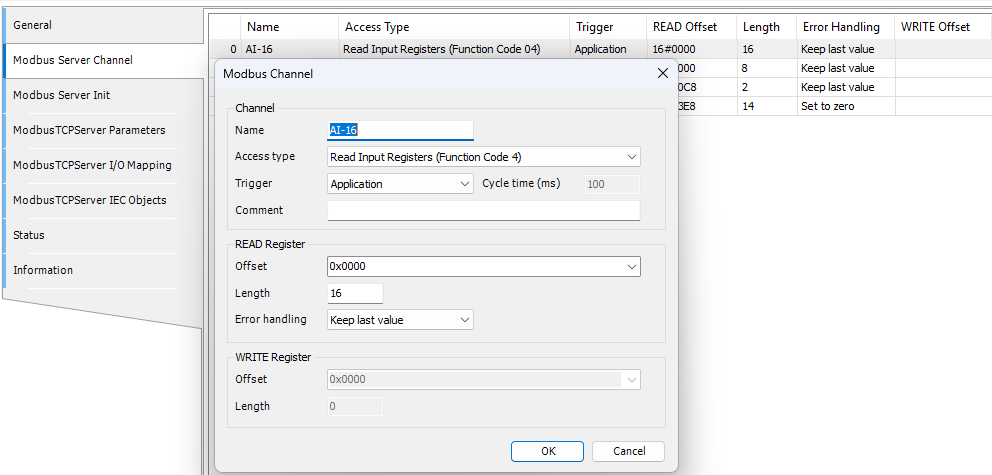
Under Modbus_TCP_Server -> Modbus Server Channel
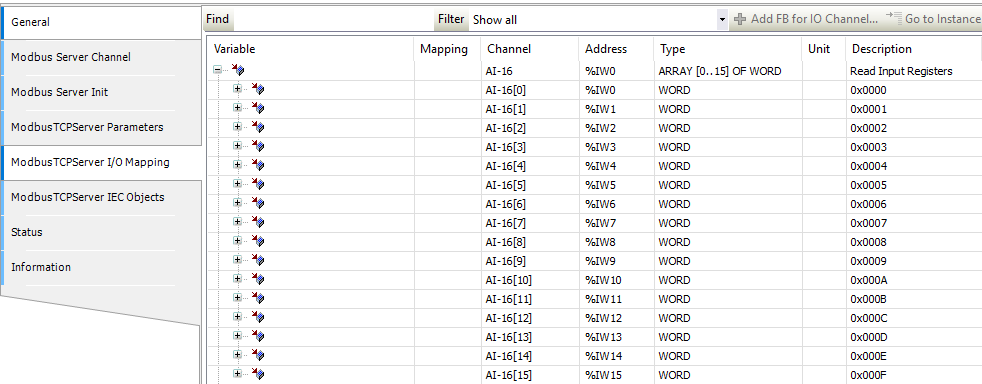
 Under Modbus_TCP_Server -> Modbus Server Channel -> I/O Mapping
 Usage
Usage
VAR
    AI1 AT %IW0 : WORD;
    AI2 AT %IW1 : WORD;
    AI3 AT %IW2 : WORD;
    AI4 AT %IW3 : WORD;
    AI5 AT %IW4 : WORD;
    AI6 AT %IW5 : WORD;
    AI7 AT %IW6 : WORD;
    AI8 AT %IW7 : WORD;
END_VAR
Note
This is an explanatory section on how to read/write to a module. For a more complete example using Codesys, visit Codesys Example.
Tag
Tag Name |
Type |
|---|---|
AI1 |
Integer, 16 Bit |
AI2 |
Integer, 16 Bit |
AI3 |
Integer, 16 Bit |
AI4 |
Integer, 16 Bit |
AI5 |
Integer, 16 Bit |
AI6 |
Integer, 16 Bit |
AI7 |
Integer, 16 Bit |
AI8 |
Integer, 16 Bit |
Usage
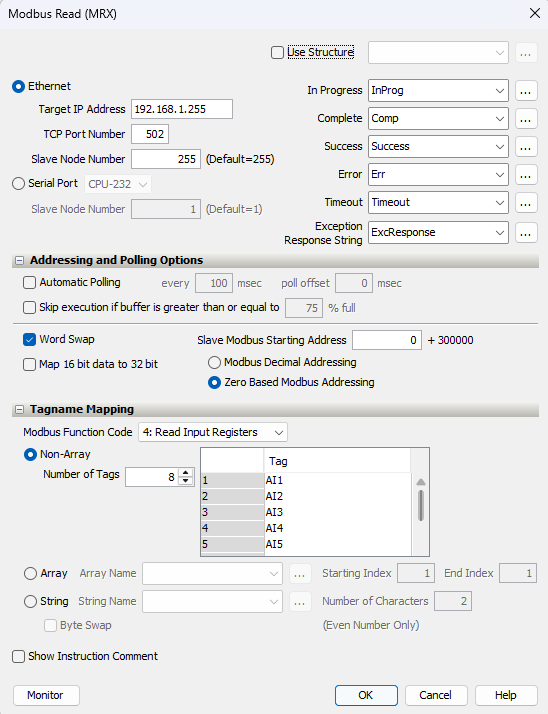
Note
This is an explanatory section on how to read/write to a module. For a more complete example using Productivity Suite, visit Productivity Suite Example.
Specifications#
Safety Precautions#
Do not add or remove modules while field power is applied.
Ensure proper grounding and wire connections to prevent electrical hazards.
Follow all local and national electrical codes.
Maintain adequate ventilation to prevent overheating.
For more details and technical support, visit Synergy Logic or contact support@synergy-logic.com.