

System Configuration#
The SLM-MX Configurator allows you to configure various system settings for your SLM-MX device.
Configuring System Settings#
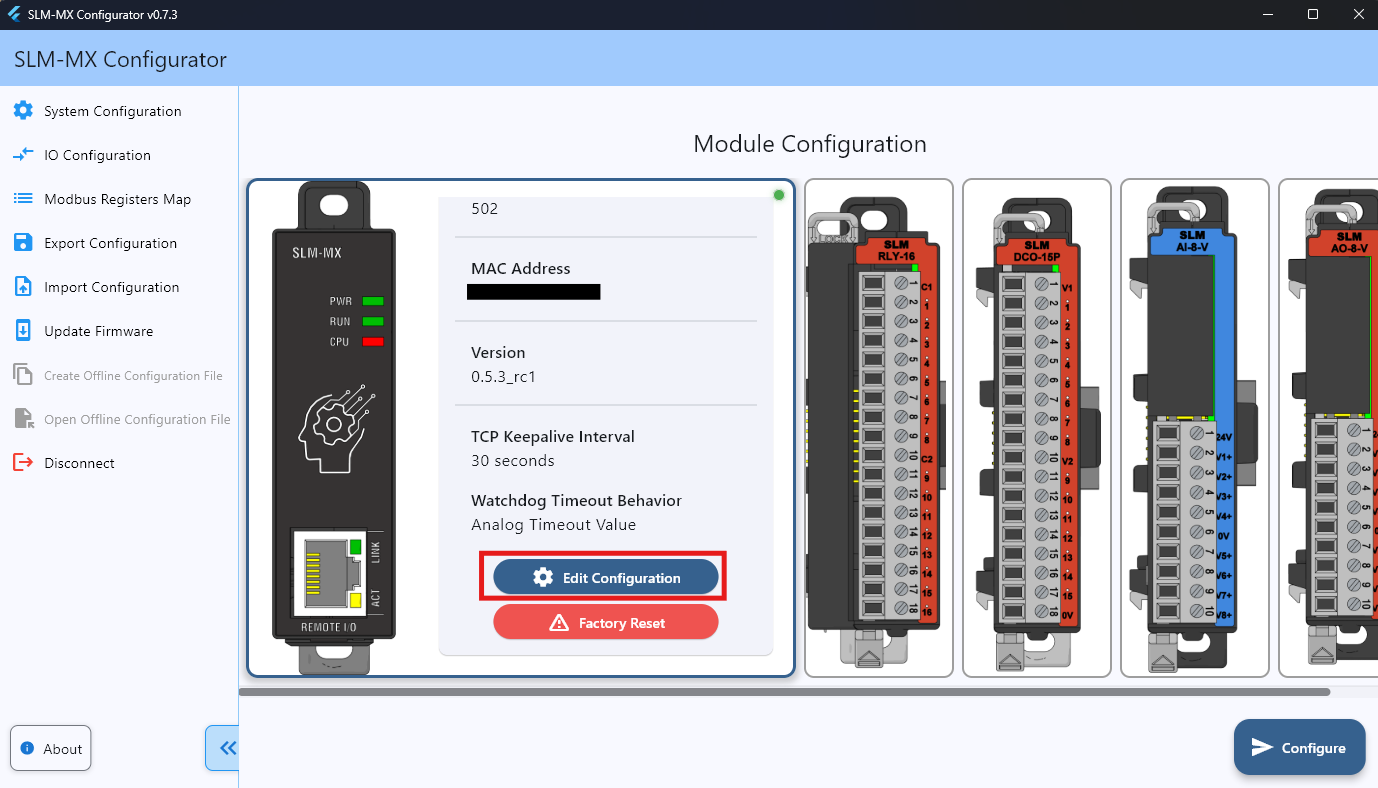
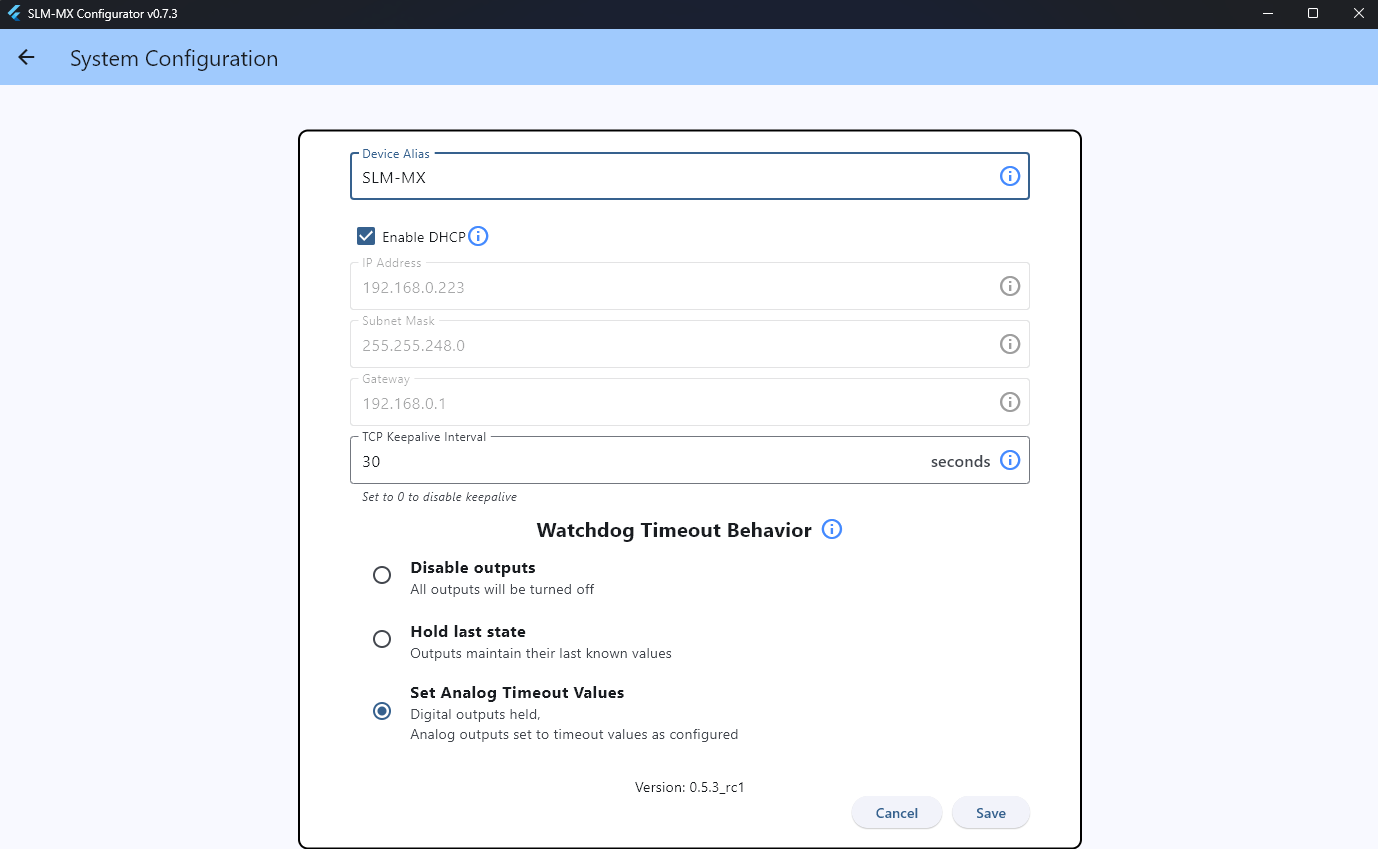
There are two ways of entering the system configuration screen after connecting to the device.
Navigate to the “System Configuration” tab on the left menu bar.
Click on the SLM-MX device card on the main screen and scroll down, there should be a “Edit Configuration” button.
Device Alias#
Device alias is a friendly name for the device that will be displayed in the configurator for identification purposes. This has a maximum length of 21 characters and cannot have spaces.
Network Configuration#
DHCP Configuration#
The SLM-MX can be configured to use DHCP (Dynamic Host Configuration Protocol) to automatically obtain network settings from your network’s DHCP server based on the device’s MAC address.
The SLM-MX has DHCP enabled by default. If you need to configure a static IP address, you can disable DHCP and enter the static IP address manually.
Enabling DHCP#
By default the DHCP checkbox is checked, greying out the static IP fields. The SLM-MX will automatically reserve an IP address from the DHCP server based on the device’s MAC address on boot.
If DHCP fails to assign an IP address, the SLM-MX will fall back to a static APIPA fallback IP address of 169.254.10.10.
Tip
We recommend using a static IP address for the SLM-MX and storing this IP address for future connections. Static IP addresses are more reliable than the automatic DHCP assignment.
Static IP Configuration#
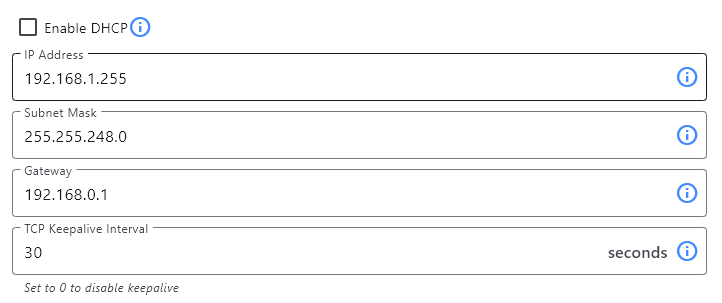
To configure a static IP address for your SLM-MX:
Navigate to the “System Settings” > “Network” section
Ensure the “Enable DHCP” option is unchecked
Enter the following information:
IP Address: The desired static IP address for the SLM-MX
Subnet Mask: The subnet mask for your network
Default Gateway: The IP address of your network’s gateway
Click Save
Wait for the device to apply the new settings
IP Address Guidelines#
When assigning a static IP address:
Ensure the IP address is within your network’s range
Avoid IP addresses that might be assigned by DHCP
Consider using IP addresses in a reserved range
Document the assigned IP address for future reference
TCP Keepalive Interval#
Important
Modbus TCP connections and disconnections will almost always work as expected. The TCP Keepalive Interval is primarily used to detect hung or invalid connections that do not disconnect properly. The SLM-MX has a maximum of 8 connections.
The TCP Keepalive Interval is the time after which an inactive TCP connection will be sent a keepalive packet every second. The SLM-MX will terminate this specific connection if the keep alive is not acknowledged 3 times.
This means that it will take TCP Keepalive Interval + 3 seconds for the SLM-MX to detect that a connection is invalid.
The default timeout is 30 seconds. Setting this value to 0 disables keep alive checks.
Watchdog Timeout Behavior#
Important
The only way to enable the watchdog timer is via modbus write to register 400201 (offset 200).
The watchdog timer monitors Modbus activity and triggers a user-defined safe shutdown when it expires.
Example usecase: if the host PLC powers off, the watchdog timer will trigger a safe shutdown of the SLM-MX to prevent the outputs from turning off unexpectedly.
Enable it by writing a timeout value within 100-65535 (in milliseconds) to modbus register 400201 (offset 200).
Writing 0 disables the timer. This is the default state. Power cycling the device will also reset the watchdog to 0.
Any Modbus request refreshes the timer. On expiration, the SLM-MX enters one of three shutdown states:
Disable outputs: Turns off all module outputs
Hold last state: Maintains current output values
Analog Timeout Values: Sets outputs to predefined values from module configuration
Note
If the watchdog timer is triggered, the SLM-MX will enter the safe shutdown state and any modbus requests will be ignored other than to read and write to the SLM-MX registers to “pet” and reset the watchdog.
Power cycling the device will also reset the watchdog.
For more information, such as how to monitor and reset the watchdog timer, visit the Watchdog Timer page.
Previous: Configuring Modules | Next: Viewing and Exporting Modbus Addresses