

Firmware Update#
The SLM-MX Configurator provides tools for updating the firmware of your SLM-MX device.
Checking Current Firmware Version#
There are multiple ways to check the firmware version:
On the initial scanning page, the firmware version will be displayed for all connected SLM-MX devices.
On a connected SLM-MX, the firmware version will be displayed on the expanded SLM-MX device card.
Downloading Firmware Updates#
Current Firmware Version#
SLM-MX Firmware v1.0.0
Release Date: September 2025
File Size: ~2 MB
Alternative Download Methods#
You can also download firmware from:
Contact support at support@synergy-logic.com
Updating SLM-MX Firmware#
To update the SLM-MX firmware:
Connect to your SLM-MX device
Navigate to the “Update Firmware” tab
Click “Browse” and select the firmware file you downloaded
Click “Update Firmware” and confirm the update when prompted. It will also show you your current firmware version and the version of the firmware you are updating to.
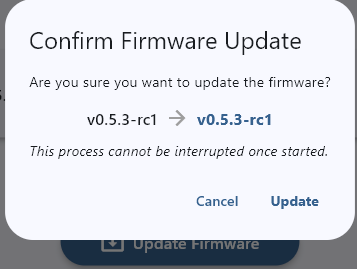
Wait for the update process to complete
The device will restart automatically after the update
Firmware Update Best Practices#
For successful firmware updates:
Always back up your device configuration before updating firmware
Ensure stable power during the update process
Do not disconnect the device during the update
Make sure to not have active modbus communication with the device during the update
If the update fails, try restarting the device and configurator software before attempting the update again.
Contact Synergy Logic support if problems persist
Previous: Creating and Importing Offline Configuration Files | Next: SLM-MX Configurator