

Onboard Peripherals#
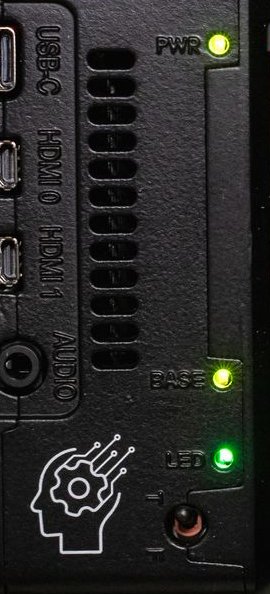
In addition to the backplane, the SLM-RP4 provides a front-panel toggle switch and an RGB indicator that your own programs can use.
The toggle switch#
A front-panel switch on GPIO 13, read through the helper package:
from slm_rp4_helpers import read_switch_state

state = read_switch_state()    # 0 or 1
That is the entire API.
Typical uses#
It is used as the run-stop switch on OpenPLC Runtime. For your custom program it has no assigned meaning, which makes it useful as a physical control that does not depend on the network:
Manual / automatic mode. Automatic runs the control loop; manual holds outputs and waits for an operator.
A local enable. Nothing moves unless the switch is in the run position.
Commissioning mode. Extra logging, slower motion, extra confirmations.
A worked example:
#!/usr/bin/env python3
import time

import synergy_logic
from slm_rp4_helpers import read_switch_state

base = synergy_logic.Base()
output = base[1][1]

while True:
    if read_switch_state():
        output.value = compute_output()
    else:
        output.value = False        # manual: hold everything off
    time.sleep(0.05)
Not a safety switch
This is a GPIO read in application software. It depends on your program running, the Python interpreter working, and the operating system scheduling you.
It is not an emergency stop and must not be used as one. An E-stop is a hardwired circuit that removes power from the actuators without asking anything in software for permission.
Debouncing#
Mechanical switches bounce for a few milliseconds. A loop reading at 50 ms intervals will not usually notice, but if you are edge-triggering on it, debounce explicitly:
STABLE_READINGS = 3

last_raw = read_switch_state()
stable = last_raw
count = 0

while True:
    raw = read_switch_state()
    if raw == last_raw:
        count += 1
        if count >= STABLE_READINGS:
            stable = raw
    else:
        count = 0
    last_raw = raw

    # use `stable`
    time.sleep(0.01)
The RGB LED#
The front panel carries a user-controllable NeoPixel RGB indicator.
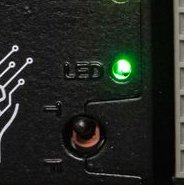
The indicator is driven on GPIO 18 through the PWM peripheral that also generates the 3.5 mm analog audio output. Analog audio is unavailable while an LED driver is running, whether in OpenPLC Runtime or in your own program.
Both language paths are preloaded:
Python uses the Adafruit NeoPixel library, already installed.
C++ uses
rpi_ws281x, supplied under~/Desktop/synergy_cpp/lib/rpi_ws281x/and already part of the build. Themain.cppshipped with the device drives the indicator, and serves as a working reference.
The indicator requires root
The signalling protocol is timing-critical, and the driving library needs
direct hardware access. A program that controls the indicator must run under
sudo, or as a service running as root.
Backplane access itself does not require elevated privileges. If you would rather not run your whole control program as root, drive the indicator from a small separate program and leave the control program unprivileged.
Suggested use#
The indicator is a status display that is readable across a room without a screen, which is useful on a controller with no HMI:
Colour |
Meaning |
|---|---|
Green |
Running normally |
Amber |
Running with a warning latched |
Red |
Faulted or stopped |
Blue |
Manual mode |
Off |
Not running |
Other GPIO#
Beyond the switch and the LED, the Raspberry Pi’s GPIO header is a normal
Raspberry Pi GPIO header, usable with RPi.GPIO, gpiozero or libgpiod.
Do not touch the backplane pins
The backplane pins are listed in Reserved GPIO pins.
Driving any of them from your own code breaks backplane communication, for the OpenPLC Runtime and for the direct libraries alike. The result is intermittent incorrect readings rather than a clear error.
Check pinctrl before claiming a pin.
pinctrl
Timekeeping#
The SLM-RP4 has no battery-backed real-time clock. See Timekeeping.
Next#
Running on Boot, covering how to start your program automatically.