

Accessing the Device#
Remote or local access to the device is needed to program it with either Python or C++.
SSH#
Factory credentials:
Username |
|
Password |
|
Hostname |
|
ssh slm-rp4@<device-ip>
If the network resolves the hostname:
ssh slm-rp4@slm-rp4
Change the default password on every unit before deployment. See Raspberry Pi / Device Setup.
Development over SSH#
Editing files directly on the device with nano or vim is possible. For a full IDE experience, Visual Studio Code with the Remote - SSH extension opens a folder on the SLM-RP4 as if it were local and supports editing, running, and debugging without copying files back and forth.
Key-based authentication#
Key-based authentication is more secure than a password and avoids repeated prompts. From the workstation:
# Generate a key if one does not already exist
ssh-keygen -t ed25519

# Copy the public key to the device
ssh-copy-id slm-rp4@<device-ip>
Shorten the command with a host entry in ~/.ssh/config:
Host rp4
  HostName 192.168.1.50
  User slm-rp4
ssh rp4
Once keys work, disable password authentication in /etc/ssh/sshd_config:
PasswordAuthentication no
Copying files#
# To the device
scp myprogram.py rp4:~/

# From the device
scp rp4:~/logs/output.csv .

# A whole directory, kept in sync
rsync -av ./myproject/ rp4:~/myproject/
Local display#
Connect a monitor to a micro-HDMI port and a USB keyboard. The device boots to a desktop environment.
System settings that raspi-config handles from the shell are also available graphically, under Preferences → Raspberry Pi Configuration:
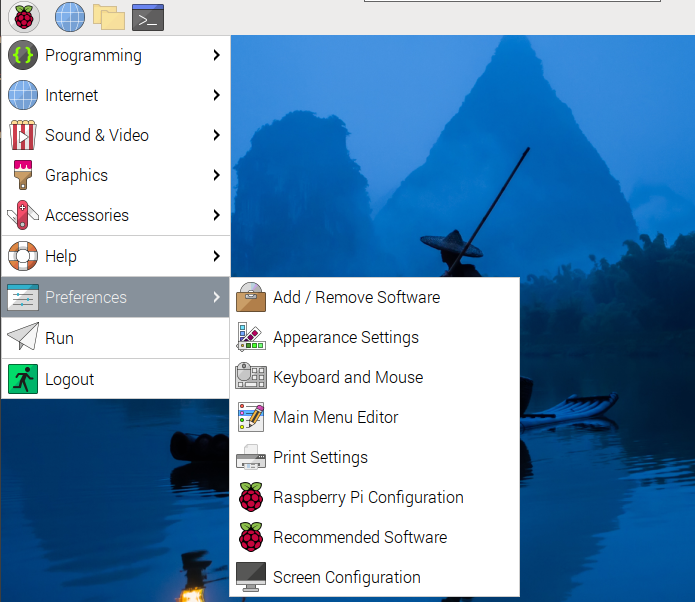
A local display is the fallback that always works. If a static IP has been configured incorrectly, the network interface disabled, or the password lost, this is how to regain access.
VNC#
A VNC server runs by default and listens on port 5900. Connect from the workstation with any VNC client, using the device’s IP address.
If VNC has been disabled on the unit, re-enable it from a terminal:
sudo raspi-config
Navigate to Interface Options → VNC and enable it.
Secure the VNC service
VNC provides full desktop control of a device that operates machinery. Set a strong VNC password and keep the port on the control network rather than exposing it more widely. Disable the service if it is not used.